
Management and integration · B OnSite module
Operational Performance Measurement
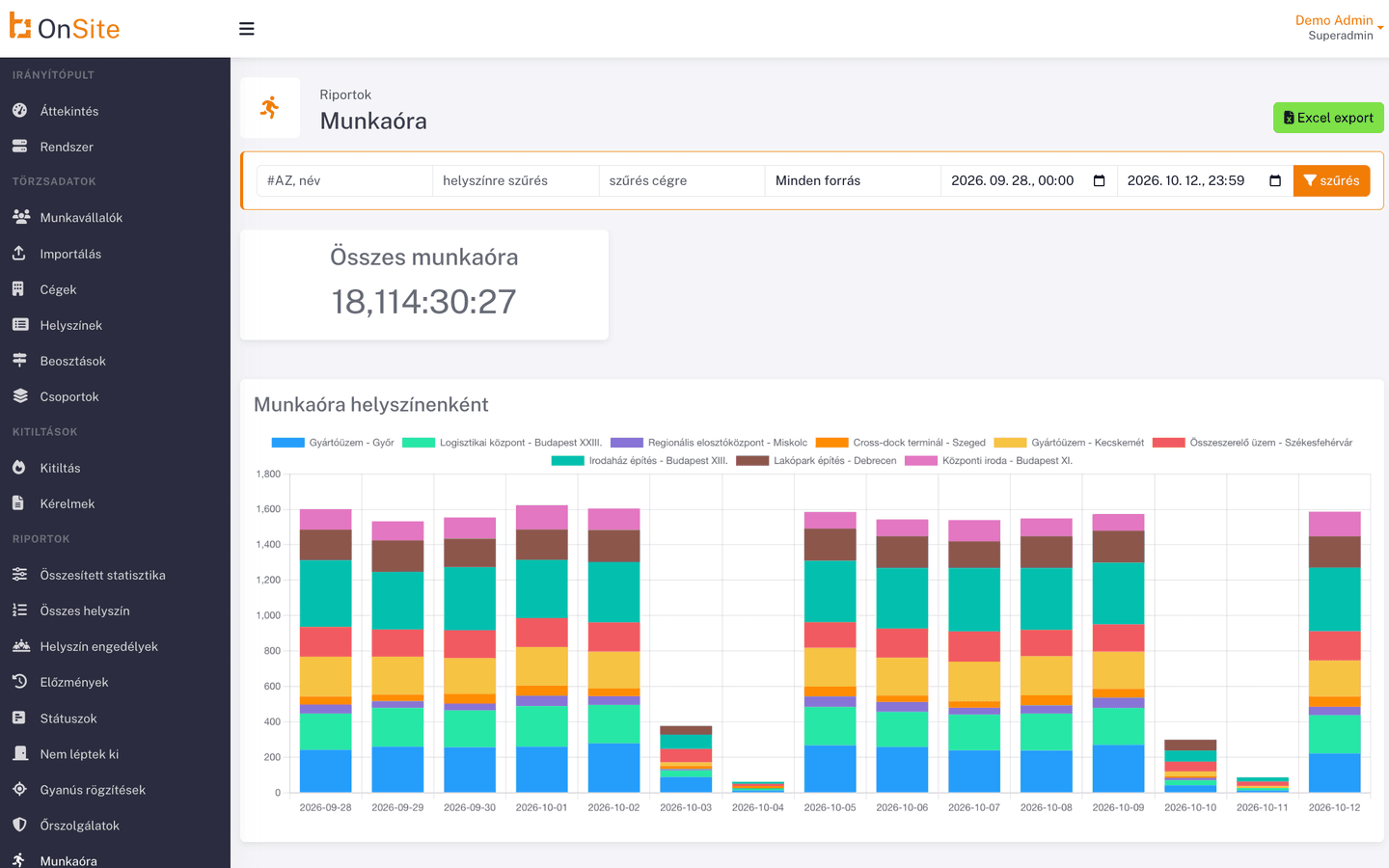
Don't estimate, know who completed how much in which area. You assign a quantity unit to each work type, workers enter the quantity on exit, and you see the totals in the quantity statement.
- Recorded quantities instead of estimates
- Quantity statement by period, site and area
- Excel export for settling up
- 1-2 weeks
- typical rollout
- Cloud-based
- no servers, no installation
- Web + mobile
- on desktop, tablet and phone
- Hungarian-language
- support by phone and email
How it works today, and with B OnSite
The most common problems we hear about, and what the module gives you instead.
- Today: You don't know who completed how much in which area: quantities are pieced together afterwards from estimatesWith B OnSite: Recorded quantities instead of estimates
- Today: Manual completion logs: inaccurate and hard to process laterWith B OnSite: Quantity statement by period, site and area
- Today: Quantity data is scattered across paper and ExcelWith B OnSite: Excel export for settling up
- Today: The list of work types has to be rebuilt at every siteWith B OnSite: Copy work types from site to site
- Today: Settling up means collecting separately who did what whereWith B OnSite: Easy to use: scan a QR code and enter the quantity
Built for industrial sites
In the OnSite Operational Performance Measurement module you set up work types per site: in a tree structure, with an icon, a name and a quantity label in Hungarian and English, and you can make entering the quantity mandatory. Work types can be copied from site to site. The worker scans the area's QR code to enter the area, selects the work type, and enters the quantity completed on exit.
How it works
Four steps, the way you use it day to day.
- Step 1
Set up work types
You set up work types per site with a quantity unit.
- Step 2
Scan the area QR code
The worker scans the area's QR code to start work, and scanning the next code stops it.
- Step 3
Work type and quantity
On entry they select the work type, and on exit they enter the quantity completed.
- Step 4
Quantity statement
You view it by period, site and area, and export it to Excel.
Features
Select a feature for details.
01 / 06
Work types with quantity units
Work types set up per site in a tree structure, with an icon, a name and a quantity label (in Hungarian and English). You can make the quantity mandatory.
What you gain
- Recorded quantities instead of estimates
- Quantity statement by period, site and area
- Excel export for settling up
- Copy work types from site to site
- Easy to use: scan a QR code and enter the quantity
What does manual admin cost you today?
A quick estimate from your own figures: the time and money paper and spreadsheets take today.
Annual cost of manual administration
€43,841
Time spent on manual administration
2,340 hours/year
Monthly cost
€3,653
Estimate from your inputs, assuming 160 working hours per month. It is not an offer.
Who is it for?
- Construction projects with quantity settlement by area
- Maintenance crews with recording by work type
- Assembly plants with quantity records
- Tracking subcontractor completion by quantity
- Several sites sharing one work type list
Security and compliance
Compliance
GDPR-compatible data handling and NIS2-compatible processes.
Identification
The platform supports RFID and QR identification, and biometric readers via integration.
Cloud-based
Available from the browser and from your phone, with no installation.
Works well together
The modules work from the same database, so there is no double data entry.

See Operational Performance Measurement in action
Request an online demo or a quote for this module. Our colleague will contact you within 1 business day.
You can also reach us directly
What to expect
- Filling in the form does not commit you to anything.
- A dedicated account manager gets in touch, not a chatbot.
- We handle your data as described in the privacy notice.