
Gate and site · B OnSite module
Guard Service
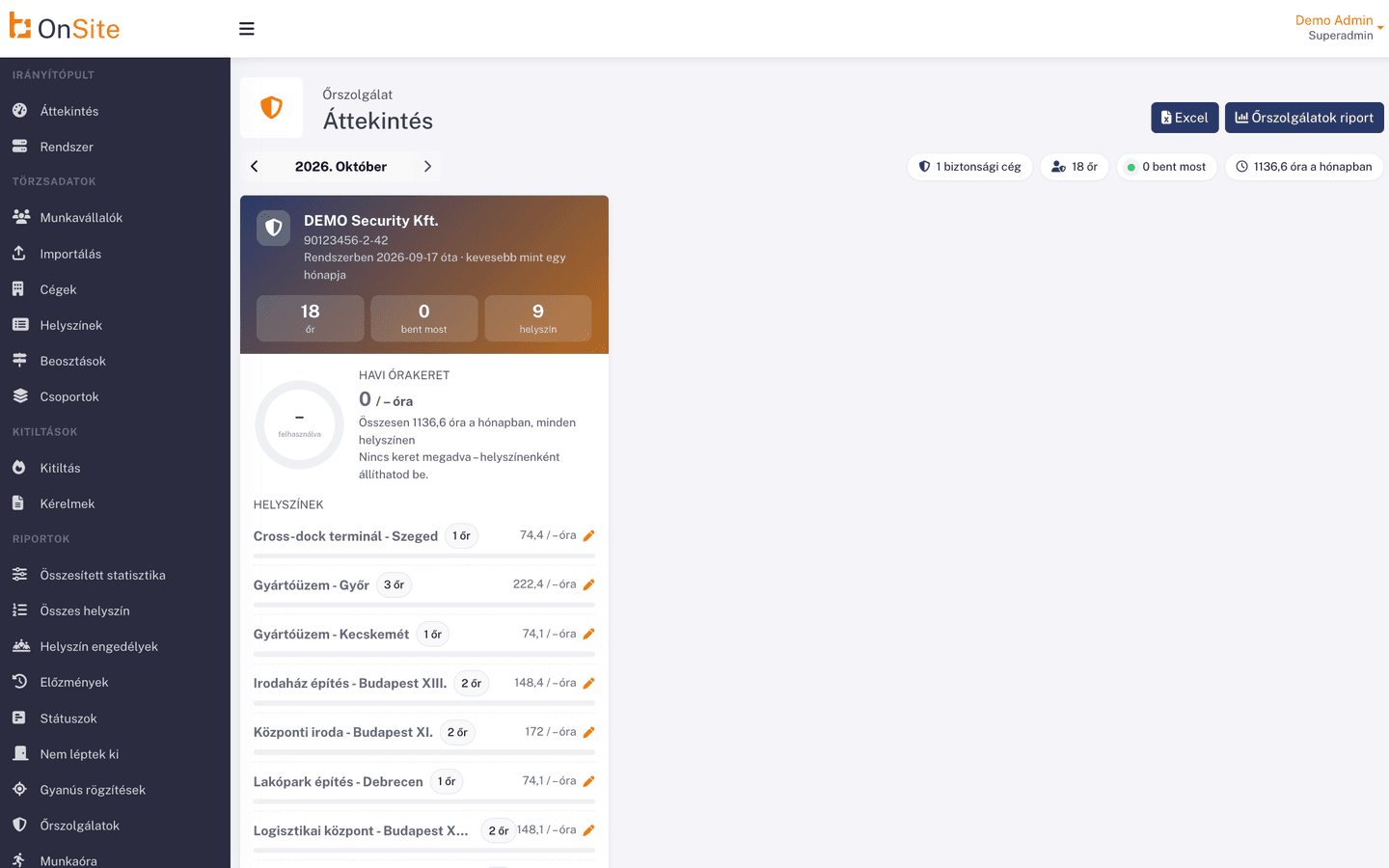
Know whether the security company's guards are actually on site. The guard's entry is recorded at the gate, and the Guard Service report shows who is in, at which site and since when.
- See which of the security company's staff are in
- Per site, with entry time
- From gate movements, no separate data entry
- 1-2 weeks
- typical rollout
- Cloud-based
- no servers, no installation
- Web + mobile
- on desktop, tablet and phone
- Hungarian-language
- support by phone and email
How it works today, and with B OnSite
The most common problems we hear about, and what the module gives you instead.
- Today: Nobody checks a paper guard log in real time: how do you know the guard is actually on site?With B OnSite: See which of the security company's staff are in
- Today: You cannot see in one place which of the security company's staff are on the site right nowWith B OnSite: Per site, with entry time
- Today: Afterwards it is hard to find out when the guard enteredWith B OnSite: From gate movements, no separate data entry
- Today: With several sites guarded, there is no overview of who is on duty whereWith B OnSite: Can be queried for a chosen time
- Today: The security company's presence and the gate data live in separate systemsWith B OnSite: Permission-based report
Built for industrial sites
The OnSite Guard Service module shows the presence of the security company's staff on duty at your site. You mark the company as a security company in the system, and its guards enter and leave through the gate like everyone else. From the gate movements, the Guard Service report shows which of the security company's staff are inside (their last movement is an entry with no exit), at which site, and when they entered.
How it works
Four steps, the way you use it day to day.
- Step 1
Mark the security company
You mark the company as a security company in the system.
- Step 2
The guard enters at the gate
The guard's entry and exit are recorded at the gate.
- Step 3
Guard Service report
In the report you see who is in, at which site and since when.
- Step 4
Query for a point in time
You can pick a point in time too: the report shows the state then, based on movements in the preceding 3 days.
Features
Select a feature for details.
01 / 05
Mark the security company
You mark the company as a security company, so the report lists only its staff.
What you gain
- See which of the security company's staff are in
- Per site, with entry time
- From gate movements, no separate data entry
- Can be queried for a chosen time
- Permission-based report
What does manual admin cost you today?
A quick estimate from your own figures: the time and money paper and spreadsheets take today.
Annual cost of manual administration
€43,841
Time spent on manual administration
2,340 hours/year
Monthly cost
€3,653
Estimate from your inputs, assuming 160 working hours per month. It is not an offer.
Who is it for?
- Industrial sites with a guard service
- Warehouses and logistics centers with night guards
- Building complexes with a security company
- Construction sites with on-site guarding
- Clients of security companies guarding several sites
Security and compliance
Compliance
GDPR-compatible data handling and NIS2-compatible processes.
Identification
The platform supports RFID and QR identification, and biometric readers via integration.
Cloud-based
Available from the browser and from your phone, with no installation.
Works well together
The modules work from the same database, so there is no double data entry.
See Guard Service in action
Request an online demo or a quote for this module. Our colleague will contact you within 1 business day.
You can also reach us directly
What to expect
- Filling in the form does not commit you to anything.
- A dedicated account manager gets in touch, not a chatbot.
- We handle your data as described in the privacy notice.